
Cyberpunk 2077 Update 2.5 introduces official console mod support. Learn how to install mods on PS5 and Xbox Series X|S, which mods are compatible, and how they affect saves, trophies and achievements.
Cyberpunk 2077 Console Mods Are Finally Here
For years, Cyberpunk 2077 players on consoles could see the creativity of the PC modding community without having the same freedom to change their own games. New character appearances, interface improvements and gameplay adjustments were largely associated with PC installations.
That restriction changed on October 22, 2026.
CD PROJEKT RED introduced official Cyberpunk 2077 console mods with the free Edgerunners 2 Update (Patch 2.5), bringing an integrated mod browser to PlayStation 5, PlayStation 5 Pro and Xbox Series X|S.
The system uses mod.io, allowing players to find compatible community-created modifications without transferring files from a computer or managing installation folders.
There are important limitations, however. Not every PC mod is available on consoles, achievements and trophies are disabled on modded console saves, and modifications can complicate cross-platform progression.
Here is how the new system works, how to install mods safely, and what to check before modifying an existing playthrough.
Cyberpunk 2077 Console Mod Support at a Glance
| Detail | Information |
|---|---|
| Game | Cyberpunk 2077 |
| Developer / Publisher | CD PROJEKT RED |
| Original Release | December 10, 2020 |
| Console Mod Support | Introduced in Update 2.5 |
| PS5 Support | Yes, including PS5 Pro |
| Xbox Support | Xbox Series X and Series S |
| PS4 / Xbox One | No official Update 2.5 mod support |
| Mod Platform | mod.io |
| Installation | In-game Mods menu |
| Account Required | CD PROJEKT RED account linked to mod.io |
| Compatible Mods | Selected community mods approved for console availability |
| Trophies / Achievements | Disabled on modded console saves |
| Cross-Platform Saves | Supported with matching compatible mods |
| Cost of Update | Free |
Information verified against CD PROJEKT RED’s official Update 2.5 announcement and support documentation on October 23, 2026.
Step-by-Step Guide to Installing Cyberpunk 2077 Mods on PS5 and Xbox
Unlike traditional PC modding, the console installation process takes place inside Cyberpunk 2077.
You do not need a USB drive, a separate computer or a desktop mod manager.
Step 1: Update Cyberpunk 2077 to Version 2.5
Start by checking that Cyberpunk 2077 has received its latest supported update.
On PS5, highlight the game on the home screen, press the Options button and select Check for Update.
On Xbox Series X|S, select Cyberpunk 2077 under My games & apps, open its management options and check for available updates.
The in-game mod browser was introduced with Update 2.5. Older versions do not provide this official feature.
Step 2: Open the Mods Menu
Launch Cyberpunk 2077 and return to the game’s main menu.
Select Mods to access the integrated mod browser.
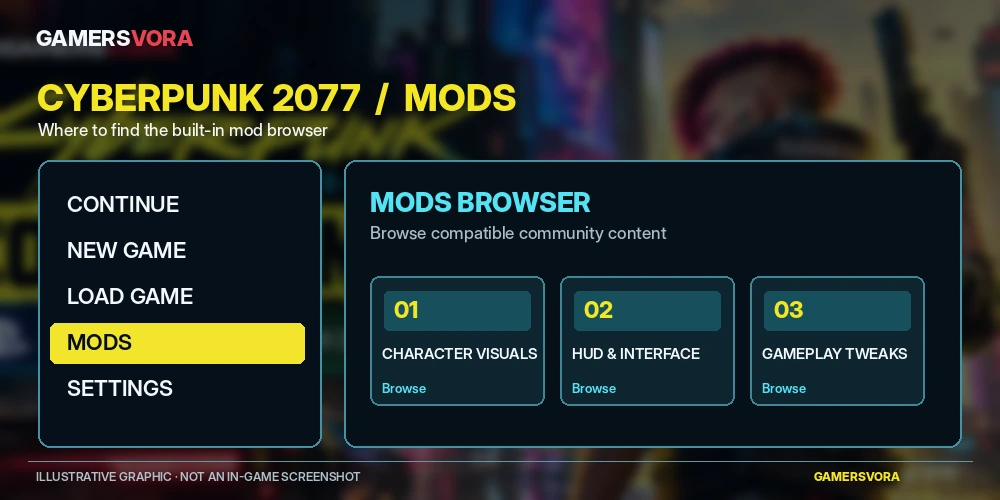
If you are already playing, return to the main menu rather than searching through V’s inventory, character or gameplay settings.
Step 3: Connect Your CD PROJEKT RED Account
The first time you access the modding system, you must sign in with a CD PROJEKT RED account and link it to mod.io.
Follow the on-screen instructions and complete the required account authorization.
You will also need to accept the relevant service terms and privacy agreements.
This connection allows the system to manage your mod subscriptions across supported platforms.
Step 4: Find a Console-Compatible Mod
Browse the available modifications and open the details of anything that interests you.
Before installing, look for the Available on consoles tag.
This distinction is essential. A mod being available for Cyberpunk 2077 on PC does not automatically mean it will work on PlayStation or Xbox.
The integrated browser provides access to supported community content, with additional modifications expected to become available over time.
Step 5: Install and Enable the Mod
Select Subscribe for your chosen mod and allow the required files to download. Depending on the interface, the installation action may be labelled Install.
Restart the game to ensure the modification is applied.
Then open the Installed section of the Mods menu and confirm that the mod appears with its checkbox selected.
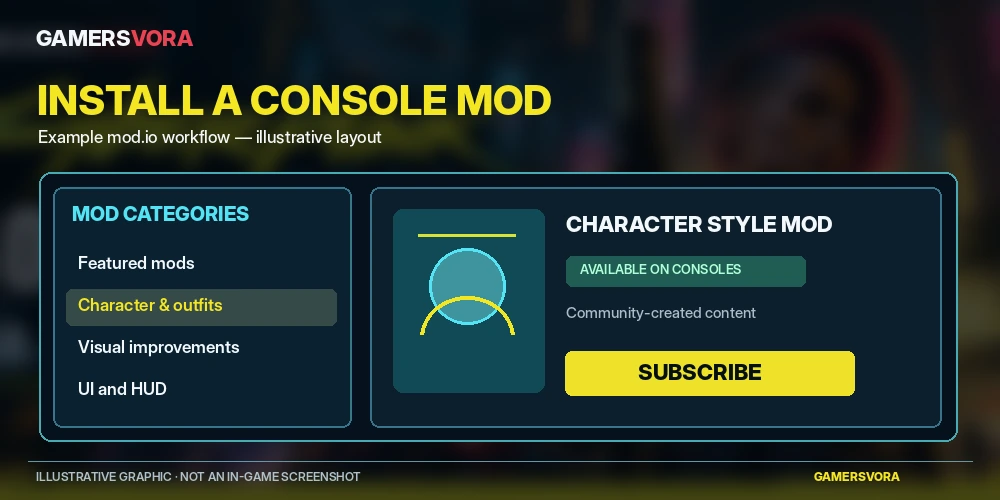
Once enabled, the modification should be available when you start or load a compatible game.
I would recommend installing one mod at a time during your first attempt. It makes identifying a problematic modification considerably easier than enabling several changes simultaneously.
Which Cyberpunk 2077 Consoles Support Mods?
Not every console that can run Cyberpunk 2077 receives the new modding system.
| Platform | Mod Support | Availability |
|---|---|---|
| PlayStation 5 | Yes | Available |
| PlayStation 5 Pro | Yes | Available |
| Xbox Series X | Yes | Available |
| Xbox Series S | Yes | Available |
| PlayStation 4 | No | Not supported |
| Xbox One | No | Not supported |
| Nintendo Switch 2 | Announced | Update 2.5 rollout pending as of October 23 |
| Windows PC | Yes | Available |
| Mac | Yes | Availability varies by storefront |
Nintendo Switch 2 is included in the official cross-platform mod support announcement, but CD PROJEKT RED confirmed that its Update 2.5 release would follow the initial October 22 rollout.
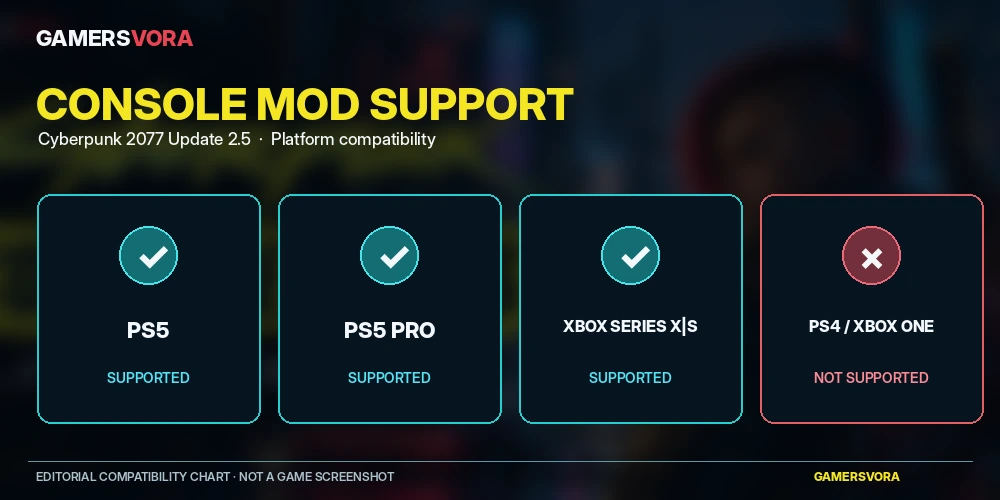
For PS4 and Xbox One owners, the distinction is straightforward: the older console versions are not receiving this new modding feature.
What Mods Can You Install on PS5 and Xbox?
Console players can access a curated selection of compatible modifications rather than the full range of mods available on PC.
Instead, supported modifications are distributed through mod.io, where compatibility information identifies the platforms they can be used on.
Available community content includes modifications in areas such as character appearance, interface presentation and gameplay adjustments.
Examples visible in the mod.io catalogue include character texture changes and interface-related improvements, although players should always check the individual mod’s console availability before installing it.
Why Some PC Mods Are Missing
PC modding can involve external frameworks, custom scripts, technical dependencies and changes that may not be suitable for console environments.
A modification created for the PC version cannot simply be assumed to work with the new console browser.
There is also a difference between the game’s built-in mod.io integration and traditional PC tools such as REDmod or Nexus Mods managers.
For console players, the supported installation method is the in-game Mods menu. Avoid tutorials asking you to modify console system files or bypass platform security restrictions.
If a particular modification is missing, check its mod.io page rather than assuming that a PC-only download can be installed manually.
Do Cyberpunk 2077 Mods Disable PS5 Trophies and Xbox Achievements?
Yes. This is arguably the most important restriction to understand before enabling mods.
CD PROJEKT RED confirms that trophies and achievements are disabled when playing from a modded save file on consoles.
The game identifies affected saves with a mod.io cog icon.
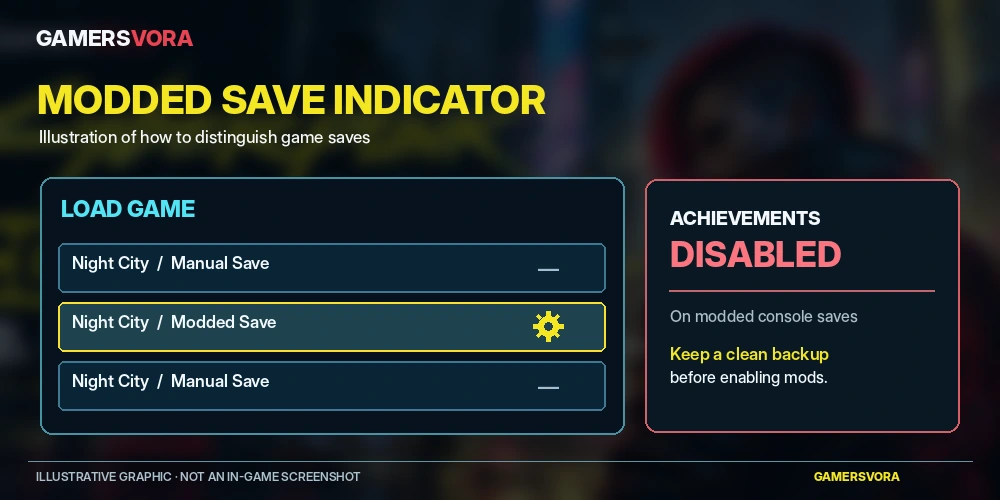
Any save created while mods were enabled is treated as a modded save.
That means players attempting to finish their trophy or achievement collection should be particularly careful about experimenting on their existing progress.
How to Protect Your Unmodded Saves
My recommendation is to preserve a separate manual save before experimenting with modifications.
Keep that original save untouched and use a different save path for your modded playthrough.
If an achievement matters to you, continue from a clean save created without mods rather than assuming that switching off a modification will restore trophy eligibility to an already modded save.
Disabling a mod also does not necessarily remove every change it has made to the saved game.
Can You Transfer Modded Cyberpunk 2077 Saves Between PC, PS5 and Xbox?
Cyberpunk 2077 supports cross-progression, but mods introduce an additional compatibility requirement.
According to CD PROJEKT RED, transferring a modded save between platforms requires the same necessary modifications to be available and enabled on the destination device.
For example, imagine installing several mods on your PC and then continuing the same character on PS5.
If one of those modifications is unavailable on PlayStation, the save may not load correctly.
Your mod subscriptions can follow your linked CD PROJEKT RED account, but unsupported mods will not appear on the destination console.
Before transferring progress, check the compatibility information for every mod involved.
For players who regularly switch between PC and console, I think maintaining a clean, unmodified playthrough is still the more dependable arrangement.
A modded second playthrough makes more sense when experimentation is the priority.
Can You Use Cyberpunk 2077 Mods Offline?
Yes, with restrictions.
CD PROJEKT RED allows modded saves to be loaded offline when all required modifications are already installed on the device.
You cannot install additional mods while disconnected from the internet.
If a save depends on a missing modification, you may need to reconnect and download that content before continuing.
For anyone who plays on a console without a permanent internet connection, installing and checking modifications before going offline is the sensible approach.
How to Disable or Remove Cyberpunk 2077 Console Mods
Mods can be managed through the same built-in menu used for installation.
Open the Mods menu, locate the Installed section and disable the relevant modification. You can also unsubscribe from mods you no longer want.
If you encounter frequent crashes, broken quest progression or unusual interface behaviour, CD PROJEKT RED advises turning off installed mods to check whether they are causing the problem.
If disabling modifications resolves the issue, try identifying which mod caused it and share the details with its developer when necessary.
Keep in mind that some mod-related changes can remain in saved data even after the original modification is disabled.
Loading a save created before installing the problematic mod may be necessary.
CD PROJEKT RED also advises against introducing mods that change quest structure during an existing playthrough.
Console Mods vs PC Mods: What Is the Difference?
| Feature | PS5 / Xbox | PC |
|---|---|---|
| Built-in mod.io browser | Yes | Yes |
| Official console-compatible catalogue | Yes | Yes |
| Broader third-party PC mod ecosystem | No | Yes |
| Traditional manual file installation | Not supported through the official console system | Available |
| REDmod and other PC modding tools | Not the console installation method | Available |
| Modded saves | Supported with limitations | Supported with limitations |
| Cross-progression | Requires compatible mod setup | Requires compatible mod setup |
For players interested in extensive customization, PC remains the more flexible platform because of its broader modding ecosystem.
For console owners, the advantage is convenience.
Rather than dealing with file locations, additional frameworks and installation dependencies, supported mods are available through a menu designed for ordinary gameplay use.
Cyberpunk 2077 also remains one of the featured RPGs in our best PC games to play selection, where we discuss its strengths as a modern open-world role-playing experience.
Troubleshooting: Cyberpunk 2077 Mods Not Working on PS5 or Xbox
If a modification fails to appear or behave as expected, begin with the basic compatibility checks.
- Check your game version. Confirm Update 2.5 is installed.
- Check your account connection. Ensure your CD PROJEKT RED account is linked to mod.io.
- Confirm console compatibility. Look for the Available on consoles tag.
- Check installation status. Open the Installed section and confirm the mod is enabled.
- Restart Cyberpunk 2077. Allow the modification to initialize correctly.
- Disable conflicting mods. Test with fewer modifications active.
- Load an earlier save if necessary. Some mod-related problems can remain in existing save data.
Installed mod updates should ordinarily be applied automatically when the game launches, but individual community modifications can still introduce compatibility problems.
Avoid repeatedly overwriting your only save while investigating an issue.
Should You Use Console Mods in Cyberpunk 2077?
I see console modding as a useful addition for returning players rather than something every new player should enable immediately.
Cyberpunk 2077 already provides an extensive selection of character builds, cyberware combinations, weapons, quests and customization options.
Someone experiencing Night City for the first time may benefit from understanding those existing systems before changing how the game behaves.
Returning players have a different opportunity. A carefully selected cosmetic or interface adjustment can offer a new perspective without requiring a complete change in playstyle.
The trophy restriction creates a practical trade-off, though.
If you are pursuing achievements, preserve your clean save. If you are starting another playthrough simply to experiment, the mod browser gives console players a level of customization that previously belonged primarily to PC gaming.
For a broader look at what makes Night City worthwhile beyond modifications, our best open-world games selection examines Cyberpunk 2077 alongside other major exploration-focused games.
Final Editorial Thoughts
The most meaningful change in Update 2.5 is not the number of mods available at launch. It is that console customization now has an official route into Cyberpunk 2077.
That matters to players who enjoy changing their characters, refining interface elements or revisiting familiar systems without owning a gaming PC.
Although console mod support introduces new customization possibilities, the approved mod.io collection remains more limited than the extensive modification options available to PC players.
Nevertheless, a built-in installation menu is a substantial improvement over having no official console mod support at all.
My advice is simple: preserve your original saves, check compatibility carefully and begin with a small number of modifications.
That way, experimenting with Night City does not have to come at the expense of a playthrough you already care about.
Frequently Asked Questions
Can you install mods on Cyberpunk 2077 PS5?
Yes. Update 2.5 introduced official PS5 mod support through the in-game mod.io browser. PlayStation 5 Pro is also supported.
How do I install Cyberpunk 2077 mods on Xbox Series X or Series S?
Install Update 2.5, launch the game, open Mods from the main menu, link your CD PROJEKT RED account to mod.io and subscribe to a compatible mod. Restart the game and verify that the modification is enabled.
Does Cyberpunk 2077 support mods on PS4?
No. PlayStation 4 players cannot use the official cross-platform mod functionality added with Cyberpunk 2077 Update 2.5, as the feature does not extend to the older console version.
Are Cyberpunk 2077 console mods free?
The Update 2.5 modding feature is included in a free game update. The supported browser provides access to community-created content; check each listing for its availability and any applicable conditions.
Can I install Cyberpunk 2077 Nexus Mods on PS5?
Not through the official console installation system. PS5 uses the built-in mod.io integration, and mods must be available for consoles.
Will installing Cyberpunk 2077 mods remove my achievements?
Playing from a modded save disables trophy and achievement earning on consoles. Preserve a separate unmodded save if you are completing achievements.
Do Cyberpunk 2077 mods transfer between PS5 and PC?
Mod subscriptions can synchronize through your CD PROJEKT RED account, but the same required mods must be compatible with and enabled on both platforms for a modded save to transfer reliably.
Do I need Phantom Liberty to use console mods?
No. The official mod browser was introduced through the free Update 2.5, not as an exclusive Phantom Liberty feature. Individual mods may have their own content requirements, so check their listings.
Trusted Sources
- CD PROJEKT RED — Official Cyberpunk 2077 Update 2.5 Patch Notes
https://www.cyberpunk.net/en/news/52120/check-out-whats-coming-to-night-city-in-the-edgerunners-2-update-for-cyberpunk-2077/ - CD PROJEKT RED — Update 2.5 Release Confirmation
https://www.cyberpunk.net/en/news/52125/cyberpunk-2077s-edgerunners-2-update-2-5-is-out-now - CD PROJEKT RED Support — Cross-Platform Mod Installation Guide
https://support.cdprojektred.com/en/cyberpunk/playstation/gameplay/issue/3034/cross-platform-mod-support-how-to-1 - CD PROJEKT RED Support — Reporting Problems With In-Game Mods
https://support.cdprojektred.com/en/cyberpunk/playstation/gameplay/issue/3033/reporting-issues-with-in-game-mods-5 - CD PROJEKT RED — Official Modding Support
https://www.cyberpunk.net/en/modding-support - mod.io — Cyberpunk 2077 Mod Catalogue
https://mod.io/g/cyberpunk-2077 - CD PROJEKT RED Support — Cross-Progression Guide
https://support.cdprojektred.com/en/cyberpunk/pc/sp-technical/issue/2425/how-to-use-cross-progression-1 - Xbox Wire — Edgerunners 2 Update and Cross-Platform Mod Support
https://news.xbox.com/en-us/2026/10/22/cyberpunk-2077-edgerunners-2-update/

Sign in to Comment
Join the Gamersvora community
Create a free account or sign in to comment and reply. This keeps conversations safer and reduces spam.