
Learn how Advanced Shader Delivery works in Call of Duty: Modern Warfare 4, which GPUs support it, how to set it up on PC, and what to check if shaders still compile.
Article Introduction
Long shader preparation screens have become a familiar frustration for PC gamers eager to jump straight into a new release. You download the game, install the latest update, press Play and discover that another preparation process stands between you and your first match.
Call of Duty: Modern Warfare 4 introduces a different approach.
MW4 Advanced Shader Delivery (ASD) allows supported Windows PCs to receive precompiled shaders before gameplay begins, significantly reducing the work traditionally performed during the game’s initial launch.
Microsoft confirmed on October 21, 2026, that the technology is available across supported AMD, Intel, NVIDIA and Qualcomm hardware. The company also highlighted Modern Warfare 4 as an example, reporting that first-launch shader preparation can take only seconds instead of the several minutes typically required without ASD.
There are some requirements, however. Your Windows version, graphics driver and Xbox PC app installation all matter.
Here’s what Advanced Shader Delivery actually changes, how to use it and what to expect if your system isn’t supported.
MW4 Advanced Shader Delivery at a Glance
| Detail | Information |
|---|---|
| Game | Call of Duty: Modern Warfare 4 |
| Technology | Advanced Shader Delivery (ASD) |
| Developer of ASD | Microsoft |
| Primary purpose | Reduce shader compilation delays and related stuttering |
| Supported operating system | Windows 11 version 24H2 or newer |
| Supported hardware | Selected AMD, Intel, NVIDIA and Qualcomm GPUs |
| Required companion app | Xbox PC app for the current recommended setup |
| Game release date | October 23, 2026 |
| Confirmation indicator | “Precompiled shaders installed” |
These are ASD requirements, not the minimum system requirements for running Modern Warfare 4.
What Is Advanced Shader Delivery in Modern Warfare 4?
Advanced Shader Delivery changes when and where the graphics preparation work happens.
A shader is a small program used by the GPU to calculate visual elements such as lighting, shadows, surfaces and effects. Today’s games rely on thousands of shader variations to handle lighting, textures, shadows and other visual effects across different environments.
PC hardware makes preparing them more complicated.
Two players might own the same game but use different graphics cards, driver versions and hardware configurations. A shader prepared for one combination cannot necessarily be used unchanged on another.
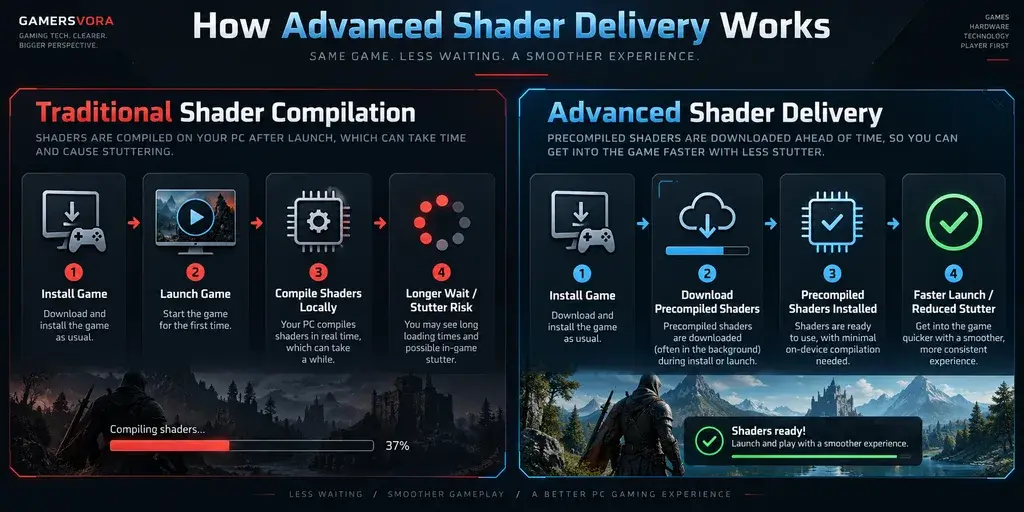
Traditionally, games compile some of these instructions locally. That processing might happen during a loading screen or when particular graphics effects appear for the first time.
The latter situation can produce shader-compilation stutter: a brief pause caused by the system preparing rendering instructions while gameplay is already underway.
Advanced Shader Delivery handles a significant portion of this preparation ahead of time, reducing the work your PC needs to perform when the game starts.
Microsoft’s system uses information supplied by the game’s developer to prepare shader packages for compatible hardware configurations. The relevant precompiled data can then be delivered alongside the game installation or its updates.
Instead of building everything from scratch when you launch Modern Warfare 4, your PC can use shaders prepared for its supported configuration.
This does not mean every graphics-related task disappears. It reduces a particular source of compilation work rather than eliminating every possible cause of loading delays or stuttering.
How to Enable Advanced Shader Delivery in MW4
Activision recommends installing the Xbox PC app before downloading Modern Warfare 4, including when the game is purchased through another supported PC storefront.
Follow these steps.
Step 1: Check Your Windows Version
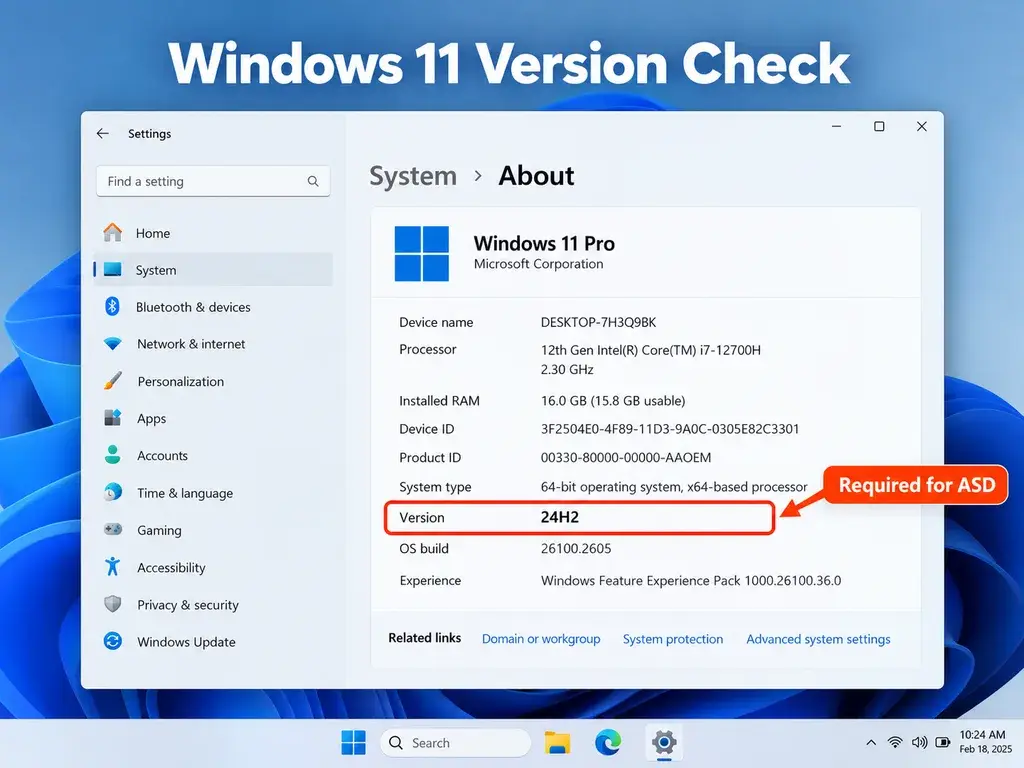
Advanced Shader Delivery requires Windows 11 version 24H2 or later.
To check:
- Press Windows + R.
- Type
winverand press Enter. - Check the version shown in the Windows information window.
- If your version is older than 24H2, check Windows Update for an appropriate supported update.
Windows 10 users should understand an important distinction: Modern Warfare 4 can run on compatible Windows 10 systems, but Microsoft’s current ASD requirements specify Windows 11 24H2 or newer.
You do not necessarily need to upgrade Windows just to play the game.
For the game’s complete hardware requirements, see our Modern Warfare 4 PC requirements guide.
Step 2: Update Your Graphics Driver
Next, install a graphics driver that supports ASD.
Microsoft published specific minimum driver versions for each supported hardware family. An older driver can prevent the technology from working even when your graphics card is otherwise compatible.
For reliable updates, use the official driver downloads provided by NVIDIA, AMD, Intel or your PC manufacturer’s support website.
Restart Windows if the driver installation requests it.
Step 3: Install the Xbox PC App
Download and install the official Xbox PC app through Microsoft.
Activision recommends completing this step before downloading Modern Warfare 4 so the system can prepare shader delivery as part of the installation process.
You don’t need to repurchase Modern Warfare 4 through Xbox simply because you own it on Steam or Battle.net.
The Xbox PC app serves as part of the supported shader-delivery setup.
Players who already installed Modern Warfare 4 before adding the Xbox app should first check for updates and test the game. Microsoft has not established that reinstalling the entire game is universally necessary.
Step 4: Install or Update Modern Warfare 4
Use the storefront where you own the game.
Keep its installation and available updates current. The shader packages must correspond to the game content and supported graphics configuration.
A game update can change rendering instructions, so matching shader data may need to be delivered again.
Step 5: Start the Game and Verify Shader Delivery
When ASD is functioning, Microsoft says Modern Warfare 4 displays:
“Precompiled shaders installed”
During startup, check the lower-left corner of the screen for information about shader preparation or installation.
That message is the clearest official indicator that the precompiled shader package has been installed.
The technology does not require players to hunt through numerous graphics settings for a special performance preset.
MW4 Advanced Shader Delivery GPU and Driver Requirements
Microsoft’s October 21, 2026 compatibility announcement lists the following hardware and driver requirements.
| GPU manufacturer | Supported hardware | Minimum driver |
|---|---|---|
| NVIDIA | All GeForce RTX GPUs and RTX Spark | 621.01 |
| AMD | RDNA 1, 2, 3, 3.5 and 4 architectures | Adrenalin 26.6.1 |
| Intel | Arc B570, Arc B580 and Core Ultra Series 2/3 graphics | 32.0.101.9150 |
| Qualcomm | Snapdragon X2 Series | 2026.08.3 |
Operating system for all listed configurations: Windows 11 24H2 or newer.
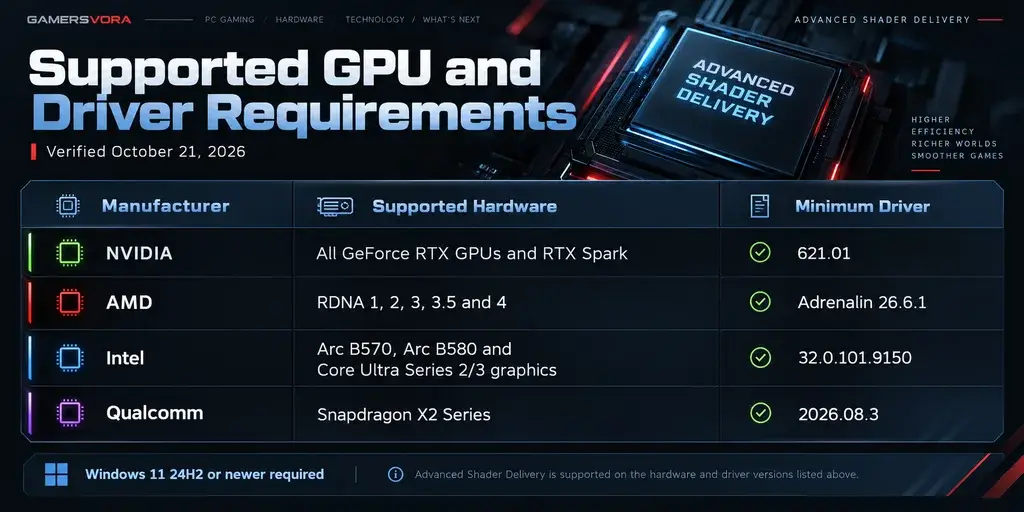
The compatibility list contains an important detail for NVIDIA owners: support isn’t restricted to RTX 50-series hardware.
Older RTX generations are included when their drivers meet Microsoft’s requirements.
Having a compatible graphics card does not automatically mean Advanced Shader Delivery will work with every game installed on your Windows PC. The game itself must support the system, and its shader packages must be available through a compatible delivery method.
Modern Warfare 4 is a confirmed supported title.
Does Advanced Shader Delivery Work on Steam and Battle.net?
This is one of the more confusing parts of Modern Warfare 4’s PC setup.
Activision explicitly recommends installing the Xbox PC app even when using another supported PC platform.
That means owning Modern Warfare 4 through Steam or Battle.net does not automatically exclude you from its recommended ASD arrangement.
There is nevertheless a distinction between using the Xbox PC app to facilitate shader delivery and a storefront implementing its own native ASD distribution.
Microsoft announced on October 21 that broader integration with Steam and the Epic Games Store is planned. The announcement does not establish that the feature is already supported natively by those digital game stores.
For Modern Warfare 4, the practical advice remains straightforward: keep the Xbox PC app installed, use compatible graphics drivers and check whether the game reports that precompiled shaders were installed.
The Xbox PC app is optional for playing MW4 itself. It is recommended for taking advantage of ASD.
Does Advanced Shader Delivery Increase FPS or Fix Stuttering?
Advanced Shader Delivery is not an upscaling technology, a frame-generation feature or a conventional graphics optimization preset.
Its main purpose is reducing shader preparation work.
The distinction matters because PC performance problems can look similar even when their causes are completely different.
Consider three situations:
A long shader-compilation screen: ASD can substantially shorten the initial preparation period.
A brief pause when an unfamiliar effect appears: Precompiled shaders can reduce stuttering associated with shader compilation.
Consistently low FPS during combat: ASD is not designed to replace GPU horsepower, reduce excessive graphics settings or resolve every CPU bottleneck.
According to Microsoft, reducing the need for local shader compilation may also lower CPU workload and energy consumption during game preparation.
But readers should not mistake these technical benefits for a guaranteed FPS increase.
If your system already delivers steady performance after shaders finish compiling, ASD’s most noticeable benefit might simply be getting into the game sooner.
For additional troubleshooting, GamersVora’s Gaming Setup Troubleshooter can help organize checks for stuttering and other PC gaming problems.
How Much Faster Does MW4 Launch With ASD?
Microsoft’s October 21 announcement provides a useful comparison.
It reports that Advanced Shader Delivery reduces Modern Warfare 4’s first-launch shader compilation to a few seconds, whereas a typical PC without ASD can spend several minutes on the process.
That is an official technology comparison, not an independent GamersVora benchmark.
Actual startup times will vary depending on hardware, installed updates, storage performance and other factors.
There is another distinction worth making: shader preparation time is not the same as the entire game’s loading time.
An online shooter still needs to initialize its engine, load content, communicate with services and prepare the selected game mode.
ASD reduces a specific delay in that sequence. It doesn’t make the complete launch process instantaneous.
Players preparing a fresh installation can also use GamersVora’s Game Download Time Calculator to estimate the download period separately from shader preparation.
Why Is Modern Warfare 4 Still Compiling Shaders?
If a shader compilation screen still appears after installing the game, it does not automatically mean there is a hardware problem or a faulty installation.
Several explanations are possible.
Your Windows Version or Driver Is Unsupported
Start by confirming Windows 11 24H2 or newer and comparing your installed GPU driver against Microsoft’s compatibility table.
A supported graphics card running an outdated driver may not qualify for the current implementation.
The Precompiled Shader Package Wasn’t Delivered
The game can launch without ASD.
If the appropriate package was not installed, traditional shader preparation may still occur.
Check for available game updates and ensure the Xbox PC app is installed. Avoid deleting driver caches or game files indiscriminately.
A Game Update Changed the Shaders
Microsoft’s technical guidance notes that previously prepared shader files may need to be regenerated when they no longer match the installed game build.
When developers change graphics-related content, some local shader compilation can return until corresponding packages are made available.
A compilation screen after an update therefore does not automatically prove that ASD has stopped supporting your hardware.
The Stuttering Has Another Cause
Shader compilation is only one potential source of uneven frame delivery.
Graphics memory pressure, demanding settings, background processes and other performance limitations can cause similar symptoms.
Networking problems can also create apparent gameplay interruptions, although network latency and shader compilation are fundamentally different issues.
If Modern Warfare 4 stutters consistently, investigate the timing and conditions rather than assuming every hitch is a shader problem.
Advanced Shader Delivery vs Traditional Shader Preloading
Modern Warfare 4’s earlier beta documentation discussed a feature called Shader Preloading.
The newer Advanced Shader Delivery approach expands the idea of getting shaders ready before play.
| Traditional preparation | Advanced Shader Delivery |
|---|---|
| Shaders may be compiled locally during initial startup | Compatible shader data is delivered precompiled |
| Initial preparation can take several minutes | MW4 preparation can take seconds on supported systems |
| Shader processing places work on the local PC | Much of the compilation work happens before delivery |
| Compilation-related stutters can occur during gameplay | Designed to reduce these interruptions |
| May repeat when graphics components change | Updated packages can reduce repeated work |
The two approaches share a goal: reducing the disruption caused by shader compilation.
What makes ASD particularly interesting is the attempt to address that problem through the Windows gaming distribution pipeline rather than leaving each player’s PC to perform the same preparation independently.
Is Advanced Shader Delivery Worth Using?
For a supported Windows 11 PC, I see little reason to deliberately miss out on an officially supported method of reducing shader compilation delays.
The advantage isn’t necessarily spectacular in every gaming session. Someone who launches MW4 once and then leaves the installation unchanged may already have a reasonably smooth experience after the initial compilation.
The stronger case appears when games receive frequent updates or when shader preparation becomes a recurring inconvenience.
There is also an important limitation: ASD requires cooperation between the operating system, GPU drivers, the game and its delivery system.
That makes it different from a simple graphics setting that can be enabled on practically any PC.
Microsoft’s expansion across major GPU manufacturers is encouraging, but broader adoption among game developers and storefronts will determine how useful the technology becomes beyond individual releases.
Modern Warfare 4 is an early example of what that experience can look like.
Frequently Asked Questions
Is Advanced Shader Delivery free in Modern Warfare 4?
Yes. ASD is a supported technical feature, not a separate paid game upgrade. You still need access to Modern Warfare 4 itself.
Do I need the Xbox PC app for Modern Warfare 4 ASD?
Activision recommends installing the Xbox PC app before downloading the game to use ASD, including on supported non-Xbox PC storefronts. The app is not required simply to play MW4.
Does MW4 Advanced Shader Delivery work on Windows 10?
Microsoft currently requires Windows 11 version 24H2 or newer for ASD. Modern Warfare 4 has separate game requirements and can support compatible Windows 10 PCs without this feature.
Does Advanced Shader Delivery support RTX 3060, RTX 4060 and RTX 5060?
Yes. According to Microsoft’s October 21 compatibility list, Advanced Shader Delivery supports all GeForce RTX graphics cards, as long as the PC meets the necessary system requirements and has NVIDIA driver version 621.01 or later installed.
How do I know Advanced Shader Delivery is working?
Check for the “Precompiled shaders installed” message near the bottom-left corner while Modern Warfare 4 launches.
Will ASD remove every shader compilation screen permanently?
Not necessarily. Unsupported configurations, missing packages or game updates can still result in shader compilation. ASD is designed to reduce this work significantly, not guarantee that it never occurs.
Does Advanced Shader Delivery improve average FPS?
It primarily addresses shader preparation delays and compilation-related stuttering. It does not guarantee higher average FPS or solve unrelated hardware performance problems.
Final Editorial Thoughts
The important change in Advanced Shader Delivery is not that Modern Warfare 4 suddenly needs less powerful hardware. For players using supported hardware and software, the main improvement is spending less time preparing graphics files and more time actually playing.
For players accustomed to lengthy compilation screens after installations and updates, that is a meaningful improvement.
The setup requirements also make clear why some players will still see traditional shader loading: modern GPU support, an appropriate Windows version and compatible delivery arrangements all need to line up.
I’d judge this feature by how consistently it works across future MW4 updates, not just by the speed of the first launch.
If Microsoft and game developers can keep those shader packages accurate as games evolve, Advanced Shader Delivery could eliminate one of PC gaming’s more persistent annoyances.
Trusted Source
- Microsoft DirectX Developer Blog — Advanced Shader Delivery Available Across Hardware (October 21, 2026)
https://devblogs.microsoft.com/directx/advanced-shader-delivery-is-available-now-across-hardware/
- Activision — Modern Warfare 4 PC Trailer, Tech Updates and Features (September 29, 2026)
https://www.callofduty.com/blog/2026/09/call-of-duty-modern-warfare-4-pc-trailer-tech-specs-features
- NVIDIA — Modern Warfare 4 Launch and Advanced Shader Delivery Support (October 21, 2026)
https://www.nvidia.com/en-us/geforce/news/dlss-4-5-cyberpunk-2077-planet-zoo-2-modern-warfare-4
- Microsoft Game Developer — Prepare Your Game for Advanced Shader Delivery (September 15, 2026)
https://developer.microsoft.com/en-us/games/articles/2026/09/prepare-your-game-for-advanced-shader-delivery-asd
- Activision — Modern Warfare 4 Beta Shader Preloading Explanation (August 2026)
https://www.callofduty.com/au/en/blog/2026/08/call-of-duty-modern-warfare-4-next-early-intel-pc-specs

Sign in to Comment
Join the Gamersvora community
Create a free account or sign in to comment and reply. This keeps conversations safer and reduces spam.